This feature is already available in our new administration portal. The new portal is currently in beta. Instructions for using the new portal can be found at the end of this article.
If you no longer wish to use Android Enterprise for your business, you can unenroll here with Google.
- Then click under Administration→ Settings→ Android Enterprise on the button Unenroll Android Enterprise (arrow in illus.).

NEW ADMINISTRATION PORTAL: Unenroll Android Enterprise
The new administration portal is currently in the beta phase. You are welcome to send us your feedback on the new portal using the corresponding button (at the bottom left of the new administration portal).
If you no longer want to use Android Enterprise for your business, you can sign out of Google.
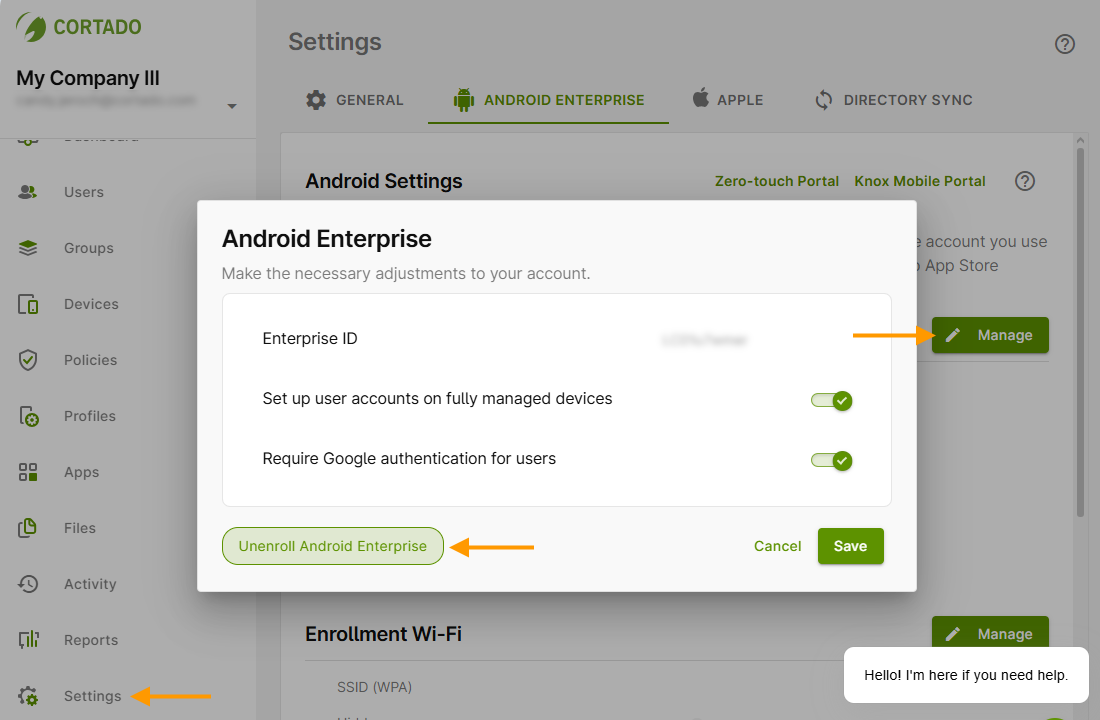
- In the admin portal, open Settings (left arrow in the image) and then go to the Android Enterprise tab.
- Under Android Enterprise, click Manage (right arrow in the image).
- Then click the Unenroll Android Enterprise button (middle arrow in the image).
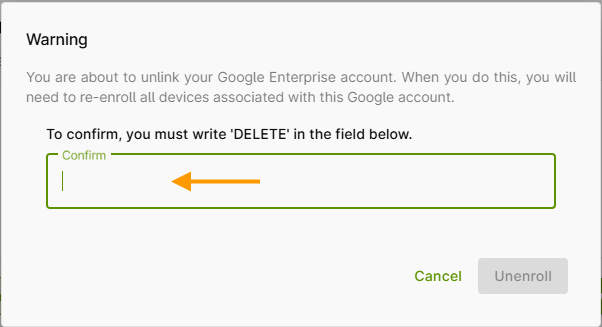
- To do so, click on the Unregister Android Enterprise button (see illus. above) and then enter the word DELETE in the field provided (arrow in illus.) to confirm.
Note! You can also delete your account for Android Enterprise directly from Google at https://play.google.com/work. Log in with your Google account. In the menu under Admin Settings (left arrow in illus.), select Delete Organisation (right arrow in illus.).
