This feature is already available in our new administration portal. The new portal is currently in beta. Instructions for using the new portal can be found at the end of this article.
By default, your users' devices synchronize with the Cortado administration portal every 30 minutes. To ensure that new assignments – such as apps, profiles, or policies – are immediately transferred to the devices, you must configure the following settings.
- Open the Settings in the Cortado administration portal.
- Then, in the Android Enterprise tab, click Configure (arrow in the image).
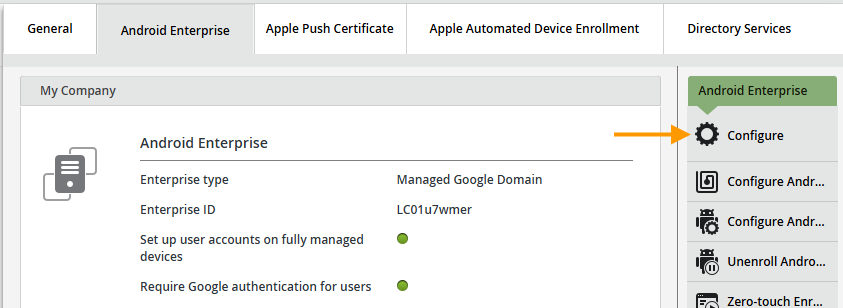
- Scroll down to the Device Synchronization section.
- We recommend the use of immediate push notifications based on Google Firebase Cloud-Messaging (upper arrow in illus.). This setting is activated by default. This ensures that all assignments (apps, profiles, policies, etc.) to your users' devices are executed immediately.

Note! The Google Play Services must be activated in the Google Workspace Admin Portal for this (arrow in illus.).

- Otherwise, pull synchronization is used automatically. Here you can define an interval between 30 and 43200 minutes in which the user's devices are regularly synchronized (lower arrow in illus.). Apps, policies, profiles and so on are then pushed to the devices at the specified interval.
NEW ADMINISTRATION PORTAL: Configure device synchronization
The new administration portal is currently in the beta phase. You are welcome to send us your feedback on the new portal using the corresponding button (at the bottom left of the new administration portal).
By default, your users' devices sync with the Cortado management portal every 30 minutes. To ensure that new assignments – such as apps, profiles, or policies – are immediately pushed to the devices, the following settings must be configured.
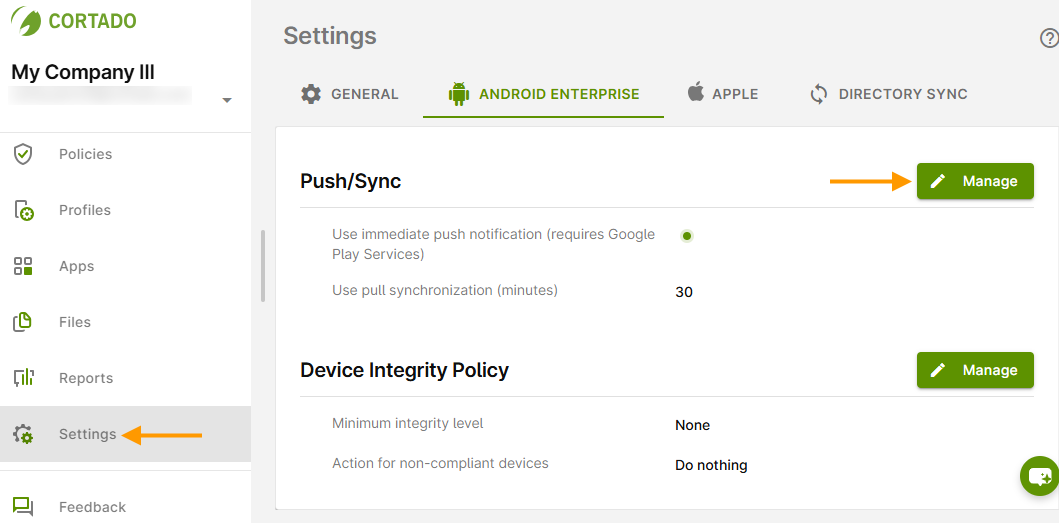
- Open Settings in the new Cortado administration portal (left arrow in the image) and go to the Android Enterprise tab.
- Under Push/Synchronization, click Manage (right arrow in the image).
- We recommend using immediate push notifications based on Google Firebase Cloud Messaging. This setting is enabled by default. This ensures that all assignments (apps, profiles, policies, etc.) to users' devices are executed immediately.
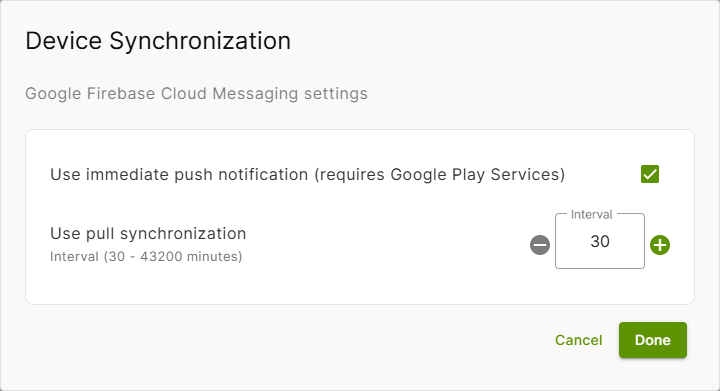
Note! Please note that Google Play Services must be enabled in the Google Workspace Admin portal (arrow in illus.).

Otherwise, pull synchronization will be used automatically. Here you can set an interval between 30 and 43.200 minutes during which users' devices will be synchronized regularly. Apps, policies, profiles, etc. will then be pushed to the devices at the specified interval.