In the first step, your company must be registered with Apple Business. Apple Business is a web-based portal for IT administrators. It allows devices purchased directly from Apple or an authorized Apple dealer to quickly and easily integrate iOS devices into the firm’s IT.
- Create an account for your company for Apple Business.
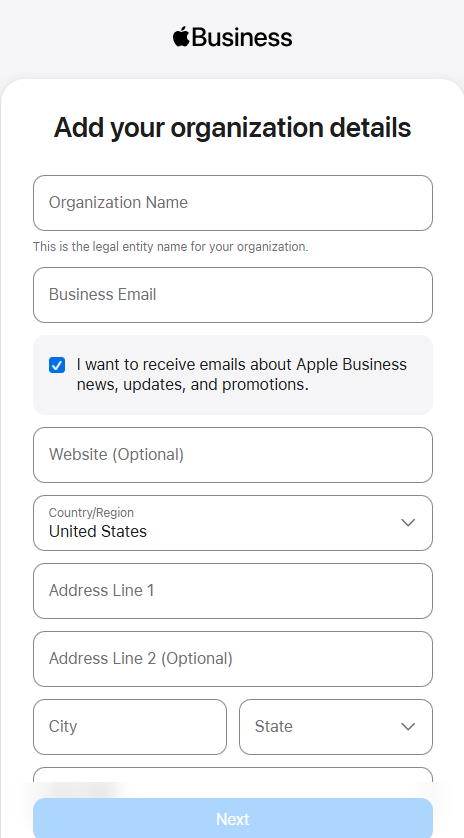
- Before you can link your devices to Apple Business, you must verify your business there.
- For this you need a so-called D&B D-U-N-S® number. Retrieve your number here, or apply for it again if necessary.
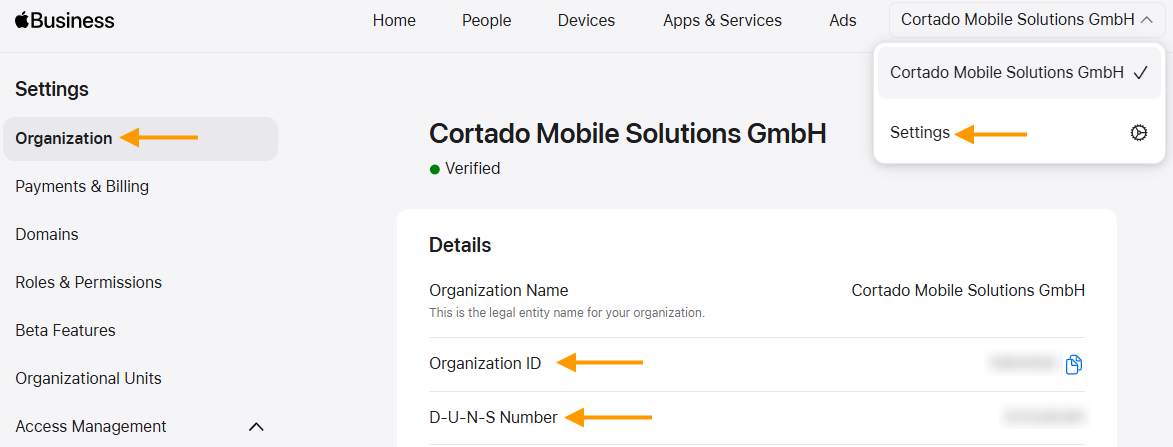
- Then enter it under Settings→ Organization in Apple Business (arrows in illus.).
- Order devices from Apple or an authorized dealer.
- Make sure that the new devices are assigned to your Apple Business account when you purchase them. To do this, your retailer needs the organization ID from Apple Business.
- You can also find your organization ID here (arrow in the image).
You can find more information on this on the Apple help pages.
Note! You can also add existing devices to Apple Business at a later date. How to do this is explained here: How to add iOS devices to Apple Business.
For more information on registration, see Apple's User Guide for Apple Business.